How to Get Your Wix Store Cited by ChatGPT (2026 Guide)
What ChatGPT, Perplexity, Gemini and Google AI read on a Wix store before they name it in an answer, and six steps to give it to them from inside the Wix dashboard with the CiteProof app. Shown on a real Wix Stores site with its first audit: cited on 9 of 50 questions, amazon.com cited instead on 18. The limits of Wix are stated.
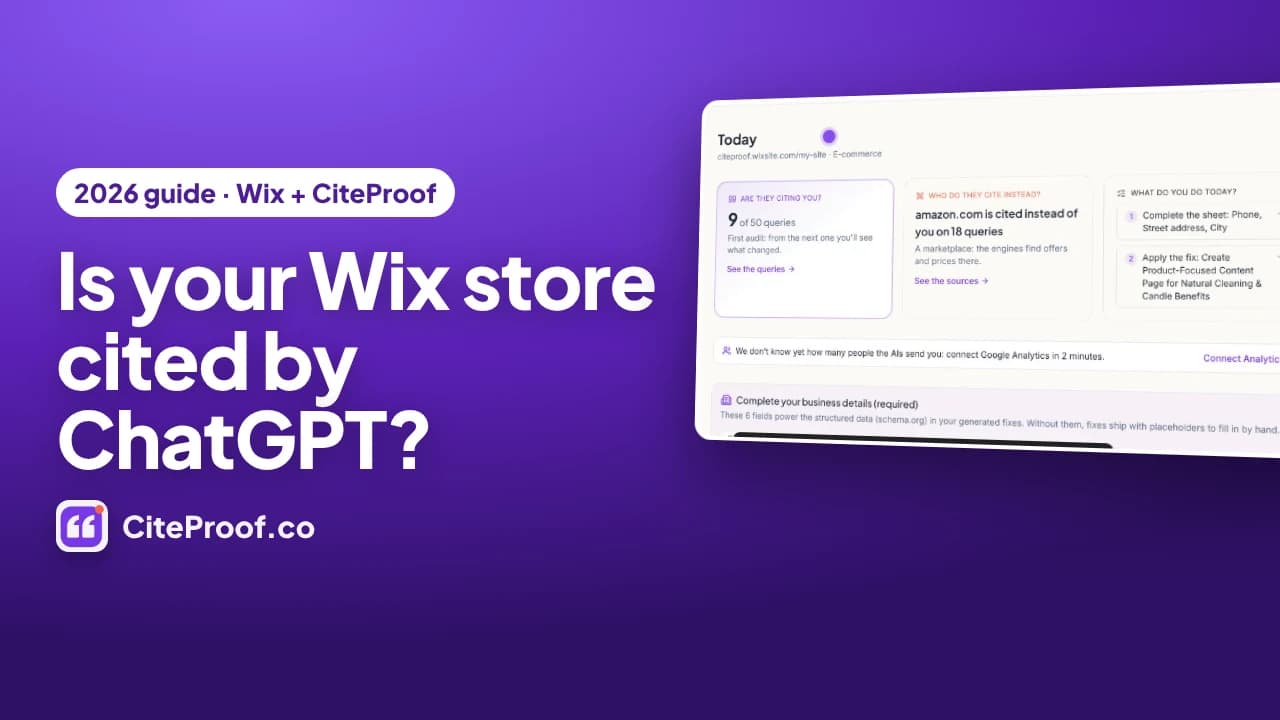
To get a Wix store cited by ChatGPT, give the AI engines the three things they check before they name a store: one clear identity on the home page, product and category pages with complete, factual text, and return and shipping policies written as facts. On Wix there are no theme files and no plugin folder, so you do it from the Wix dashboard: the CiteProof app for Wix measures your customers' questions on the AI engines, applies title, meta description and Organization schema to the home page with one click, and writes product and category rewrites into Wix Stores from your own catalog. Two things no app can do on Wix: publish llms.txt or change robots.txt.
Get the CiteProof app for Wix
Install it from the Wix App Market: it measures your customers' questions on ChatGPT, Perplexity, Gemini and Google AI, and fixes your pages from your Wix dashboard. Free to start, no password.
This is the written version of the video above, with the screens from the video. Everything is shown on a demo Wix store, Fernlight Botanicals: handmade soaps and scented candles, fifteen products on Wix Stores, a free Wix plan on a wixsite.com address, built from a standard Wix template. The audit numbers are real: they are the first CiteProof audit of that store, run on 13 October 2026. The same method works on Shopify and WooCommerce; the companion guides are linked at the end.
Chapters of the video: 0:00 Intro · 0:21 What AI actually cites · 1:18 Install the app · 1:54 Measure your customers' questions · 2:45 Title, description and schema on Wix · 3:09 Product pages · 3:44 Category guides · 4:15 Returns and shipping · 4:47 Measure again.
Key facts from the demo store
| What was measured | Result on Fernlight Botanicals |
|---|---|
| Customer questions asked to the AI engines | 50 |
| Questions where the store is cited by at least one engine | 9 of 50 |
| Site cited instead of the store most often | amazon.com, on 18 questions |
| Products read from Wix Stores | 15, scores between 59 and 65 out of 100 |
| Most common product issue | no GTIN/EAN code |
| Category pages (For the Body, All Products, For the Home) | category truth 36, 36 and 40 out of 100: no text above the grid |
| Fixes from the first audit | Organization and Product schema (critical), brand entity on the home page (high), meta description (medium), plus guided fixes |
What "cited by ChatGPT" means for a Wix store
When a shopper asks an AI engine for a natural soap for dry skin or a soy candle for a small flat, the answer names a handful of stores and links to a few pages. A store is cited when the answer names it, or uses one of its pages as a source. Perplexity, Gemini, Claude and the AI Overviews in Google Search work the same way: a short generated answer with a small set of sources, picked from pages the engine could read and trust.
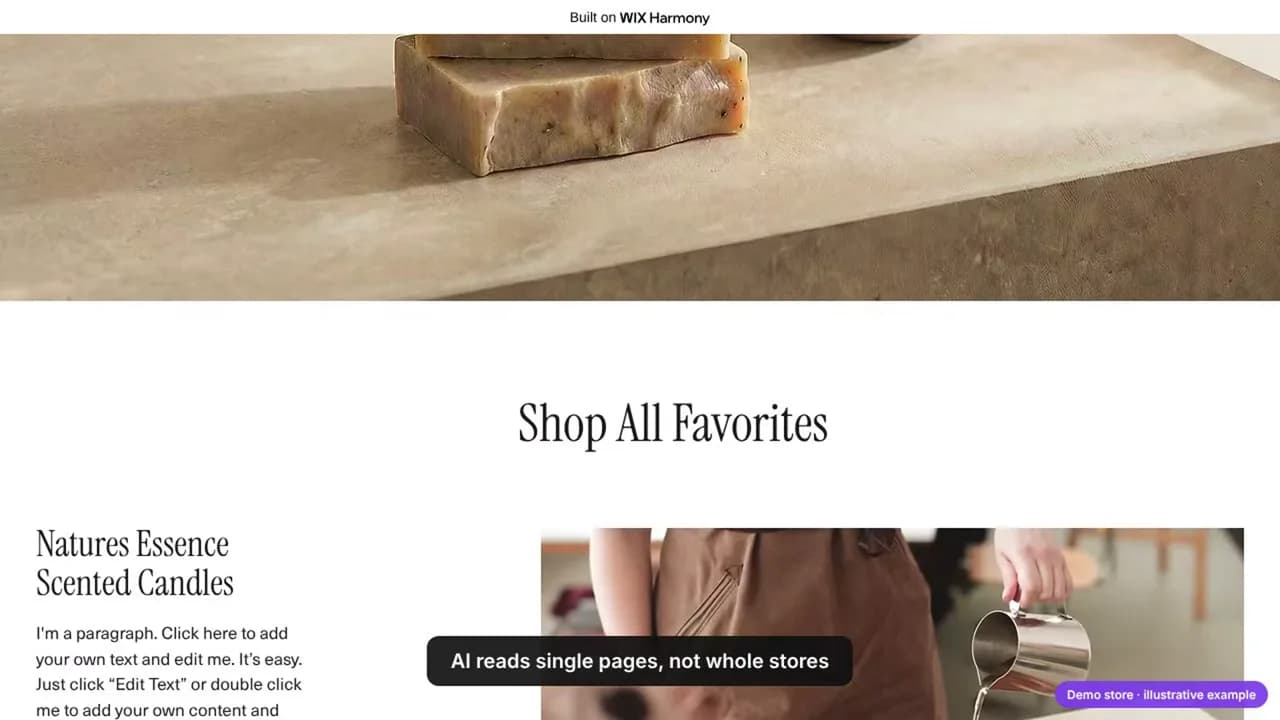
Two facts decide most of what follows:
- AI engines read single pages, not stores. A citation points to one URL: a category page, a product page, a policy page. On the demo store, the home page still carries the Wix template's placeholder ("I'm a paragraph. Click here to add your own text"): a sentence no engine will ever quote.
- On every page they check three things. Who you are (the identity on the home page), what you sell (product data: descriptions, codes, images), and how you sell (returns, shipping). If one of the three is missing, the engine picks another store, or a marketplace.
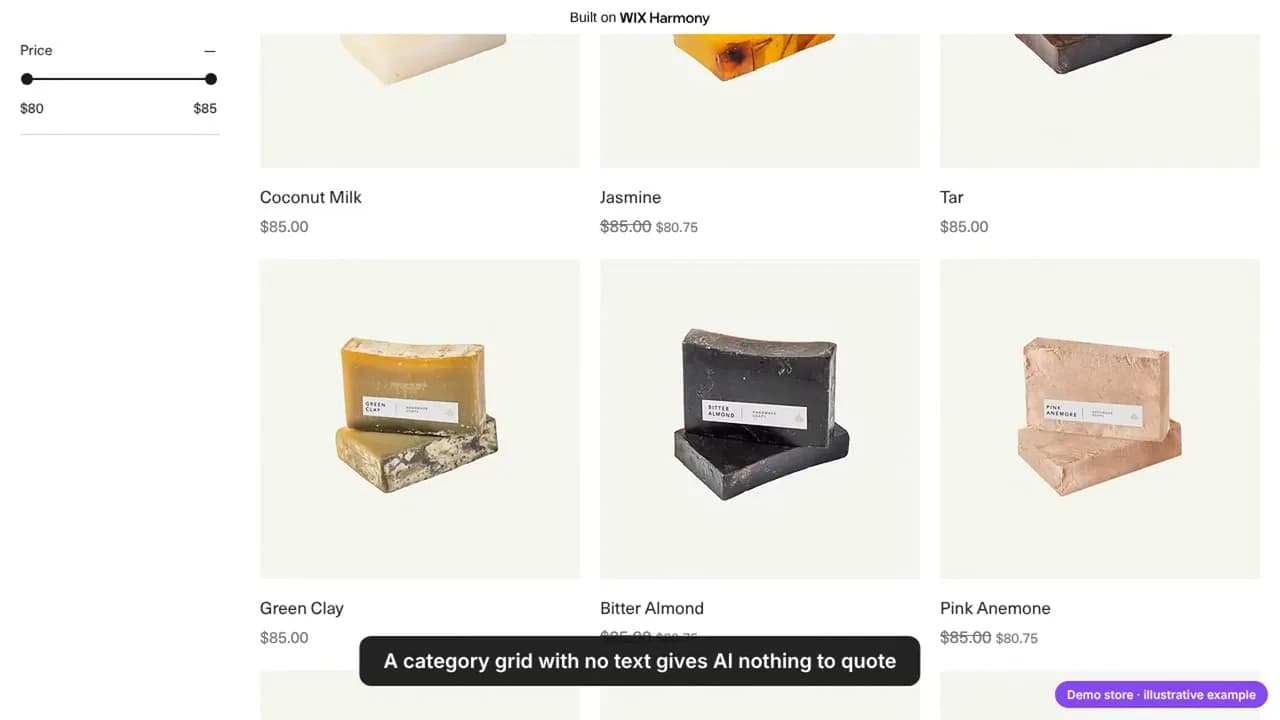
The pages that get cited most are the ones that help choose: a category page with a short buying guide, a product page with complete data, a policy page with clear terms. A grid of products with prices and nothing else, like the one above, gives the AI nothing to quote.
Step 1 · Install the app and connect the store
Install CiteProof from the Wix App Market. The app creates your CiteProof account by itself, with no password, and adds a CiteProof page to the Wix dashboard of your site. From that page you see the score and the last analysis, who is cited instead of you, the fixes ready to apply, the questions measured, the store's readiness and a short checklist; every row opens the full dashboard already signed in.
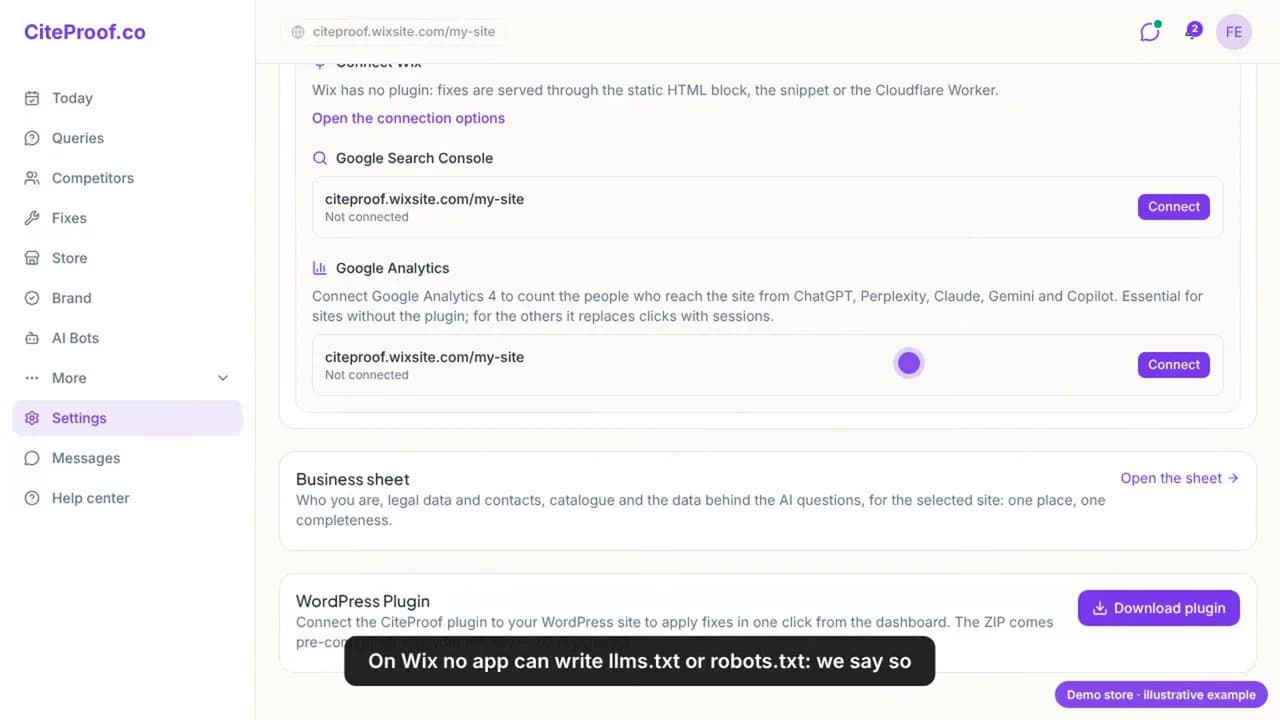
Step 1 takes two minutes
Open the Wix App Market page, click Add to Site, and choose your store. CiteProof appears in your Wix dashboard menu.
In the dashboard the site shows up with platform Wix and the Wix app badge. Two limits are stated on the page itself, because they are true for every app on Wix:
- No app can publish
llms.txtor changerobots.txt. Wix manages both and does not let apps write files at the site root. - Wix does not expose the store policies to apps. The app skips that check instead of failing it; you read those pages yourself (step 6).
Step 2 · Measure your customers' questions
Before changing anything, get the facts. The first analysis asks the AI engines the questions your customers ask, a mix of conversational questions ("What scents are available in Fernlight Botanicals candles?") and search-style queries ("best botanical candles for home fragrance"), and records for each one whether the store is cited, on which engine, and which sources the answer used.
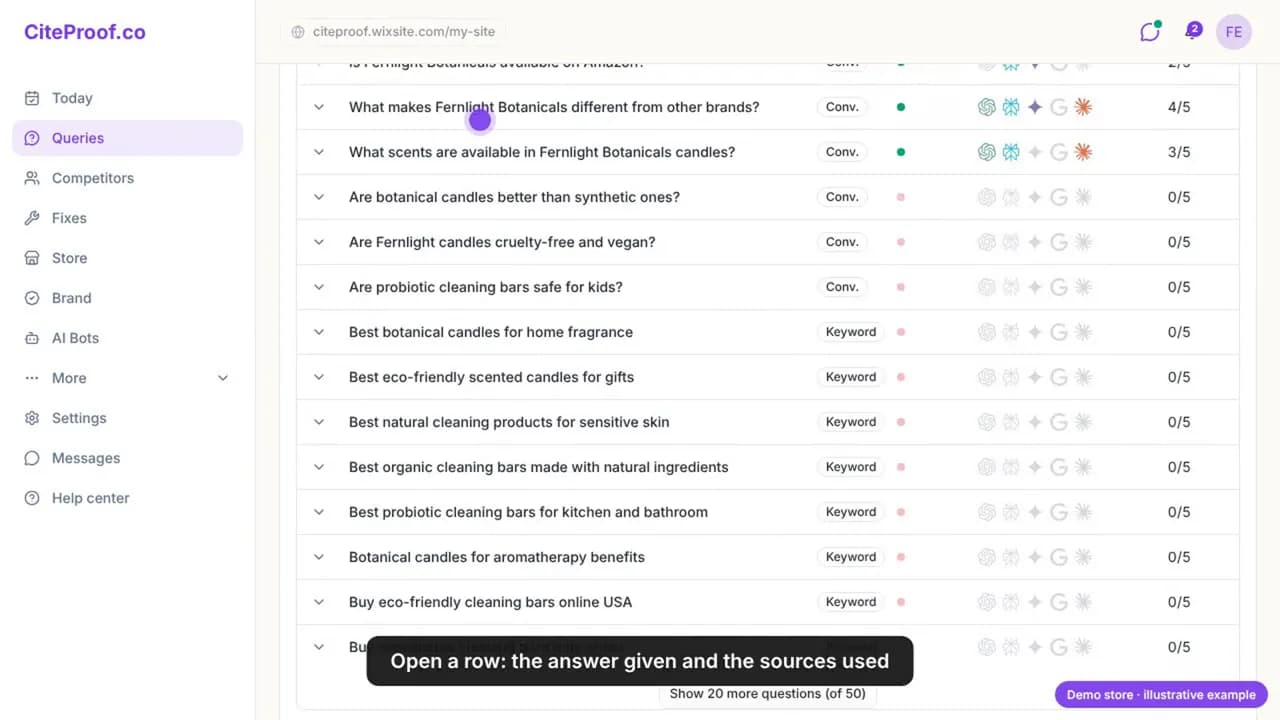
The pattern on the demo store is the one most young stores share. Questions that name the brand are cited: "What makes Fernlight Botanicals different from other brands?" on 4 of 5 engines. Generic product queries, the ones that bring new customers, are not: "best eco-friendly scented candles for gifts", "best organic cleaning bars made with natural ingredients", 0 of 5. Open a row and you see the answer each engine gave and the sources it used instead.
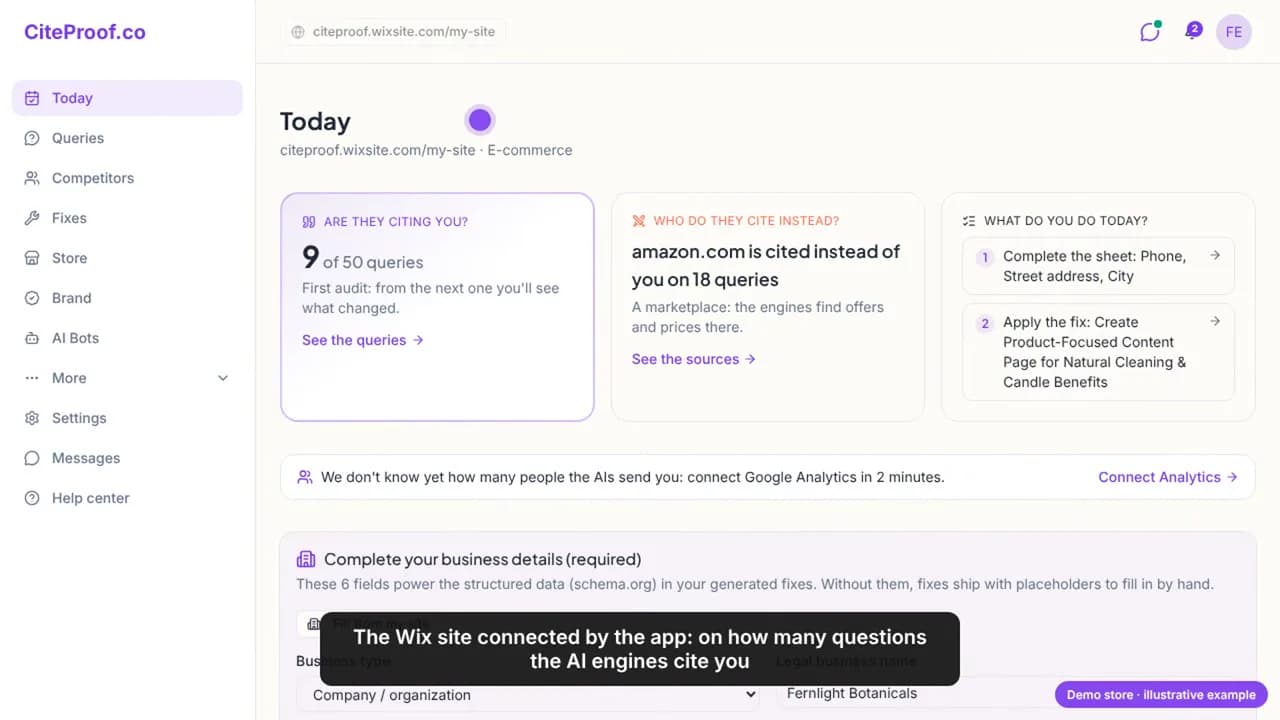
The Today page reduces it to three things. Here: cited on 9 of 50 queries; amazon.com is cited instead of the store on 18 queries, a marketplace where the engines find offers and prices; and what to do today, starting with the business sheet (phone, street address, city), because the identity on the home page is the first thing an engine checks. That is the baseline every later measurement is compared against.
Keep the dates. Citations move in weeks, not hours. Measure the same questions on the same engines once a month and compare; a single measurement says where you are, not whether anything worked.
Step 3 · Title, description and schema, applied on Wix with one click
From the analysis come the fixes, ranked by priority. On Wix the site-level fixes go to the home page, which the app finds among the static pages by its canonical address.
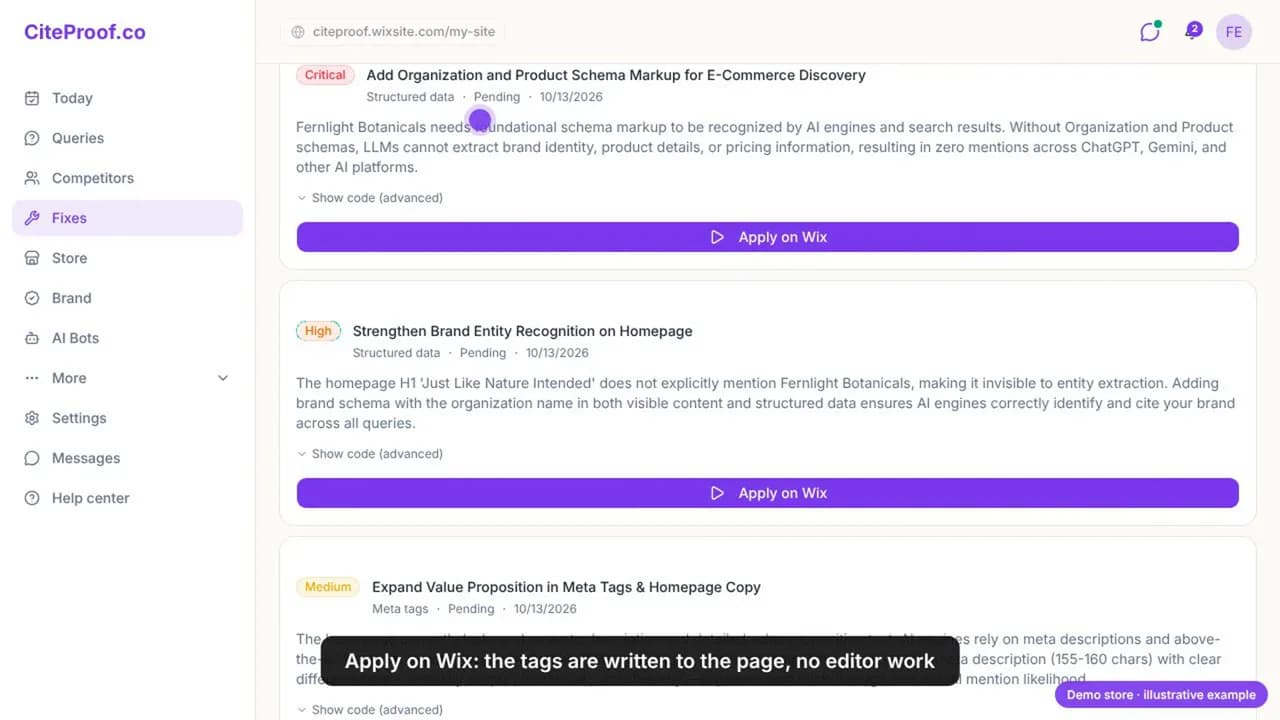
On the demo store the first audit produced, among others:
- Critical · add Organization and Product schema: without them the engines cannot extract the brand, the products and their details.
- High · strengthen the brand entity on the home page: the home page heading, "Just Like Nature Intended", never names Fernlight Botanicals.
- Medium · a meta description that says what the store sells and for whom.
Apply on Wix writes the change through the page's Wix SEO settings: the title and meta description become tags of the page; the schema, rebuilt from your confirmed business sheet, becomes a JSON-LD script tag. The change is saved as a revision and then published. Remove from site puts the previous tags back; they are kept for that purpose. Nothing is applied until you click, and the schema is refused while the business sheet is incomplete, so a fake phone number or a missing address never goes live.
Step 4 · Product pages AI can understand
The app reads your Wix Stores catalog (the most recent products first, within what your plan covers) and scores every product on what an AI engine needs to recommend it: description, product code, images, variants, price and availability.
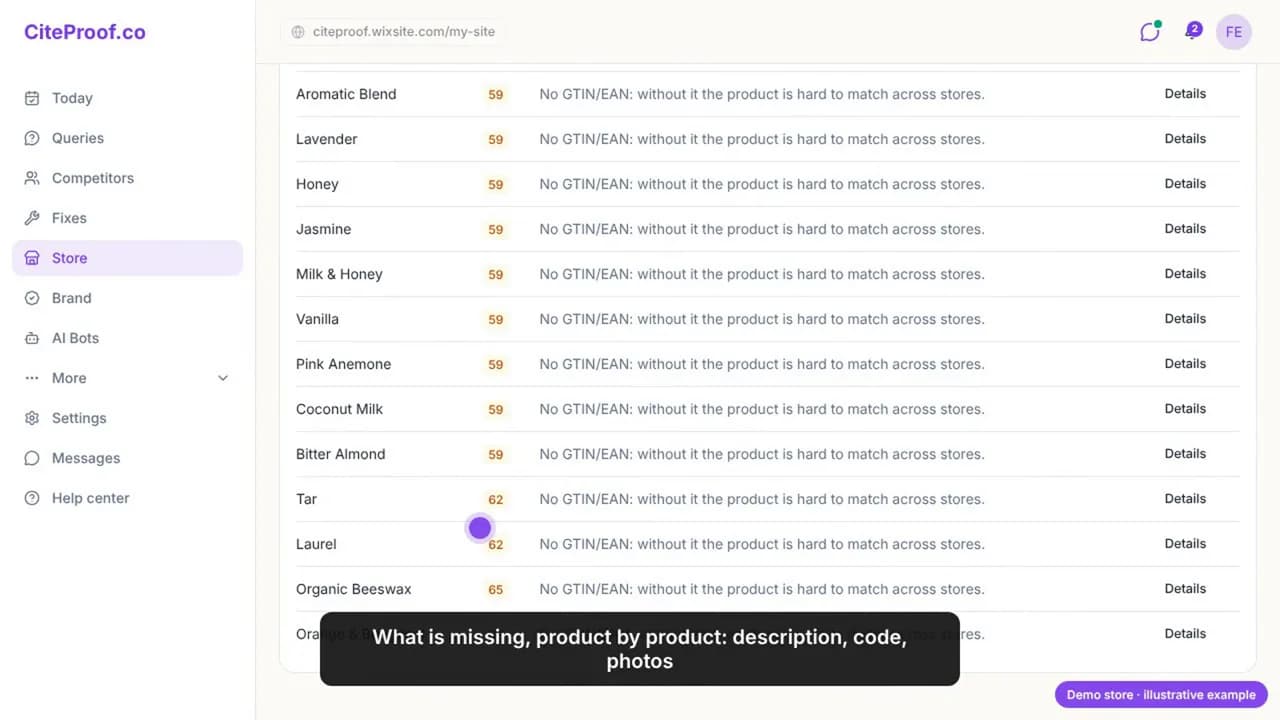
On the demo store all fifteen products score between 59 and 65, and the first issue is the same for each: no GTIN or EAN, so the product is hard to match across stores and catalogs. Shopping answers compare offers; a product without a code is hard to place next to the same item elsewhere.
Open a product and you get the rewrite, written only from the product's real data: what it is and for whom, features with figures, specifications and a short FAQ. No number that is not in your data. Apply it, and the description goes into the Wix product (Wix turns it into rich content) with the SEO title and description in the product's tags. Change your mind, and you undo it.
Not yet on Wix: alt text for the product images, which the app writes on WordPress and Shopify. Add it in the Wix product editor, one short, concrete line per photo.
Step 5 · Category pages: the buying guide
This is the step that moves citations the most. AI answers quote guides: how to choose, which product for whom, what to look for. A category that is only a grid gives them nothing to quote.
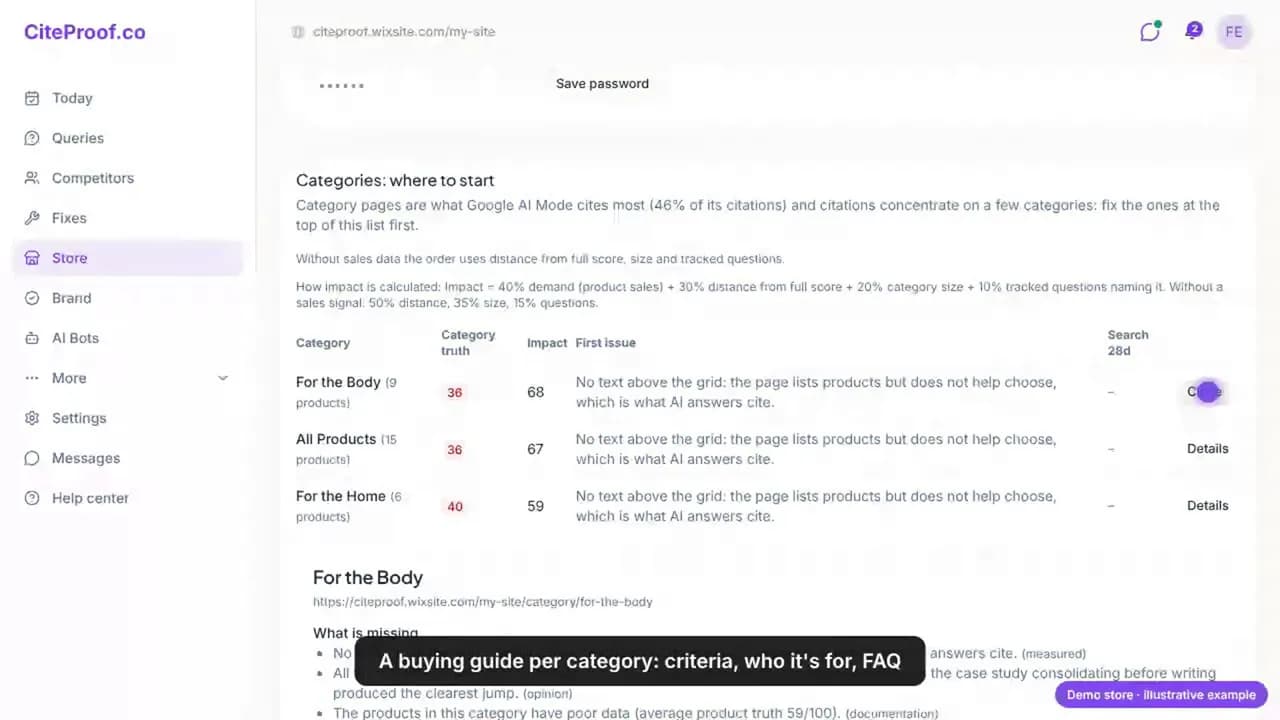
The app ranks your Wix categories by impact. On the demo store, For the Body, All Products and For the Home score 36, 36 and 40 out of 100 for the same reason: no text above the grid, so the page lists products but does not help anyone choose. For each category the app writes a mini guide using only your catalog:
- Choice criteria for the category (for soaps: skin type, scent, ingredients, size, price range).
- Who each product is for, naming the products you actually sell.
- Frequently asked questions, taken from the questions measured in step 2.
One click, and the intro and body become the rich description of the Wix category, with its SEO title and description in the category's tags.
Step 6 · Returns and shipping, written from facts
Without a clear return policy an AI engine will not recommend a store, and Google shows the policies next to the price. Wix creates the policy pages for you (shipping, refund, terms). The trap is in the word "creates".
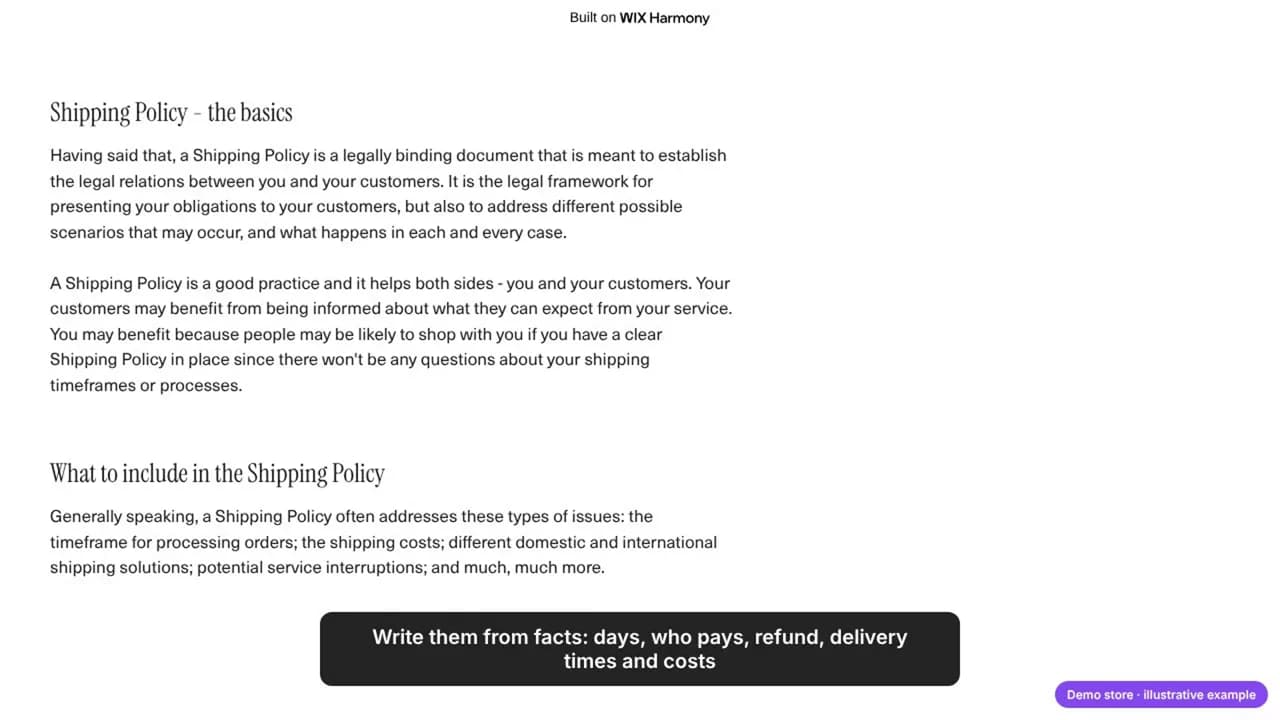
On the demo store the shipping policy is still the template: a paragraph about what a shipping policy is, with no days, no costs and no countries. A machine cannot quote a policy that states no terms. Replace it with facts:
- Returns: how many days, in what condition, who pays the return shipping, how and when the refund is made.
- Shipping: processing time, delivery times and costs by destination, the free-shipping threshold if there is one (the demo store's banner promises free shipping over $50; the policy page should say the same).
Wix does not expose these pages to apps, so the app cannot read or score them for you yet. Read them yourself once, with one question in mind: could a machine quote this sentence as a fact?
Measure again
Then measure again: the same 50 questions, the same engines, a month later. The Today page either moves or it does not, and the head-to-head with amazon.com and the other cited sites shows against whom. That is the whole method: measure, fix what the AI reads, measure again. No projections and no promises, only the answers themselves, with their dates.
Try it on your own Wix store
Install CiteProof from the Wix App Market: free to start, no password, everything from your Wix dashboard. Your first analysis tells you on which questions the AI engines cite you, and who they cite instead.
The same method on other platforms: How to get your Shopify store cited by ChatGPT and How to get your WooCommerce store cited by ChatGPT.
Frequently asked questions
Does Wix's built-in SEO make my store citable by ChatGPT?
Wix prints basic meta tags and a product schema, which is necessary but not sufficient. What decides a citation is whether the page's text answers the question (a category guide, a factual product description, a policy with real terms) and whether the identity on the home page is clear. The CiteProof app writes those from your own data and applies them through Wix's SEO settings.
Can an app on Wix change robots.txt or publish llms.txt?
No. Wix manages robots.txt through its own settings and no app can write files at the site root, so there is no llms.txt either. What decides citations is the content of your pages and whether the engines can read them, not those files.
Will the app change my Wix store without asking?
No. Fixes wait on the fixes page until you click Apply on Wix, and each applied fix can be removed with Remove from site, which restores the previous tags. Product and category rewrites are applied only after you read and accept them, and can be undone.
Does this work on a free Wix site?
Yes. The demo store in this guide is a free Wix site on a wixsite.com address with Wix Stores. A custom domain helps trust and sharing, but the steps are the same.
Why is amazon.com cited instead of my store?
Because for generic product questions the engines look for offers, prices and comparable products, and a marketplace has all three on every page. A small store wins those answers with what a marketplace does not have: category guides that help choose, product pages with complete data and codes, and a clear identity. On the demo store the brand questions are already cited; the generic ones are where the work is.
How long does it take to see citations change?
Weeks, not hours. Engines re-read pages on their own schedule and Google AI Overviews follow the index. Measure the same questions once a month on the same engines and compare the dates.
What about the store policies, if the app cannot read them?
Write them on the Wix policy pages from facts (days, who pays, refund, delivery times and costs), replace any template text, link them from the footer, and check them yourself once. The Organization schema the app applies links to the policy pages once they exist.
Read next
CiteProof tracks your brand's visibility across AI answer engines and tells you what to change to get cited. With one rule: the score only moves up after the Verify Bot confirms the fix is actually live.