Today is the first page you see. It is built around three questions, in this order: are the AI engines citing you?, who do they cite instead?, what do you do today? Everything else on the page is detail.
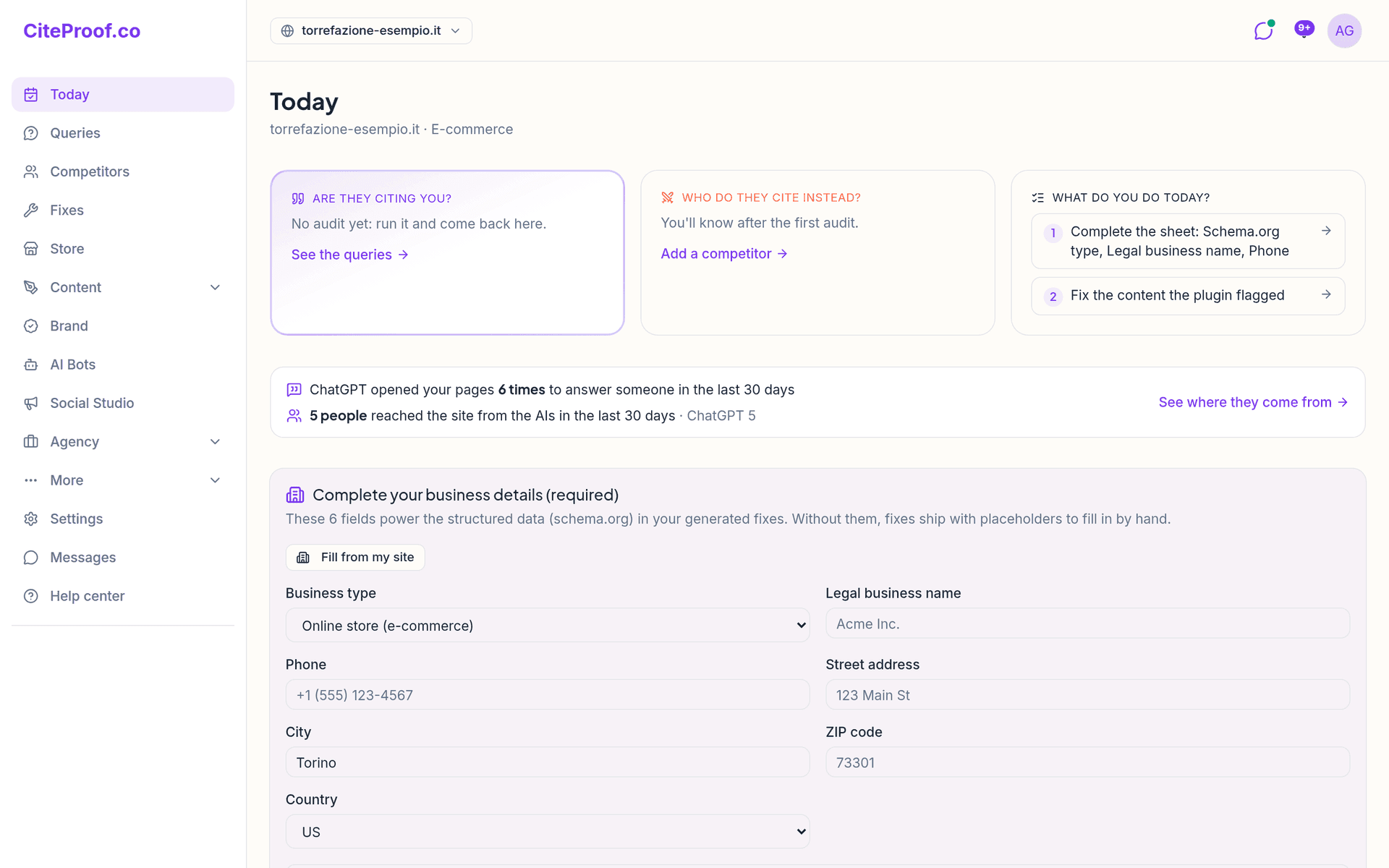
The three questions
Are they citing you? How many of your tracked queries were cited in the latest audit, out of the total. Under the number: how many are new and how many were lost since the previous audit (after the first audit it says the comparison starts with the next one). See the queries opens the Queries page.
Who do they cite instead?
- If a confirmed competitor beats you, its name and on how many queries, with an example. See the head to head opens Competitors.
- Otherwise, the third-party site cited in your place on the most queries, with what kind of source it is (directory, reviews, encyclopedia, press…). See the sources opens the source map on the Brand page.
- If nobody beats you, it says so. Before the first audit: You'll know after the first audit.
What do you do today? At most three concrete actions, in the order that unblocks you first:
- complete the business details that are missing;
- connect the site (plugin or app);
- apply the most urgent fix;
- write the answer to a query a competitor wins (with the Content Agent);
- fix the content the plugin flagged;
- review the pending fixes.
Each one is a link to the page where you do it. When there is nothing to do: All in order. The next audit will tell if it changes.
Just below, a strip says how many people reached the site from the AI assistants in the last 30 days (from Google Analytics or the plugin) and how many times the assistants opened your pages to answer someone. The detail is on the AI Bots page: see AI Bots.
One next action
Under the three questions there is at most one card, the one that unblocks you first:
- Complete your business details (required): six fields (business type, legal name, phone, street, city, postal code) that the structured data in your fixes needs, otherwise they ship with placeholders. Fill from my site pre-fills what it finds; Save and continue saves. It also shows while the first audit runs, so the wait becomes useful setup.
- Run the full audit: after an upgrade, when the last audit used fewer queries than your plan has. Included in the plan.
- The orientation after your first audit.
- The next guided step of the setup.
- The card to connect the site, when it is not connected yet.
- Complete your business setup for more accurate audits: the onboarding that uses your industry, target and competitors to generate relevant queries.
To do today
The To do today card lists the concrete actions that move your AI Visibility Score:
- Fixes: how many are pending and how many are urgent, with the urgent ones listed. Go to fixes opens them: see Applying fixes.
- Plugin or connection status: active, waiting for the first heartbeat, not configured, or last heartbeat hours ago, with the button to set it up or check it.
- Content to fix (seen by the plugin): weak pages for the AI engines, orphan pages, images without alt text, inconsistencies with the fact sheet, URLs invented by AI, IndexNow failing. Only when there is something.
- Wrong facts in AI answers: how many, with See what they get wrong, which opens Brand.
- Next audit: when it runs, the automatic cadence of your plan, the audits used this month and Re-run audit now.
Banners below the list
Information that does not need an action today sits under To do today:
- the trial banner: how many days are left. In the last three days it turns coral and offers Add payment method; before that, Manage subscription. See Managing your subscription.
- Finish connecting your sites: sites without Search Console, without Google Analytics or without a connected CMS.
The rest of the page
Further down: a preview of your tracked queries, the AI Visibility Score with its sections and the change since the previous audit (see Reading your score), what changed between audits, the before and after since you started, and a reminder when the audit is old.
Why does Today say No audit yet?
The three questions need a completed audit. Start it from the score card; while it runs the page says the result lands in a few minutes.
Why does Who do they cite instead? show a website and not a competitor?
No confirmed competitor beats you on the tracked queries, but a third-party site, such as a directory or a review site, is cited where you were missing. Open the source map to see what to do there.
Can I hide the business details card?
It disappears by itself once the six required fields are saved. You can fill them from the card or from the business profile in Settings.